
Probably you already know it: The new Windows Store App class libraries prevent proxy generating using frameworks like Castle.Core because System.Reflection.Emit namespace is missing in the limited framework they’re using.
But we still want to do TDD and therefore we need a nice mocking framework, like FakeItEasy, don’t we?
In this blog post I will show you the best way I came up with to develop Windows Store App compatible code with TDD.
So, how should you setup your project?
- Put all your productive code that will be TDD-ed into a PCL class library where you select whatever target frameworks you like to support
- Create your test assembly as a regular class library
- Add the references to FakeItEasy and your test framework(s) of choice (e.g. NUnit + FluentAssertions) to your *.Test assembly
- Only put the UI stuff that you can’t test into a Windows Store App project
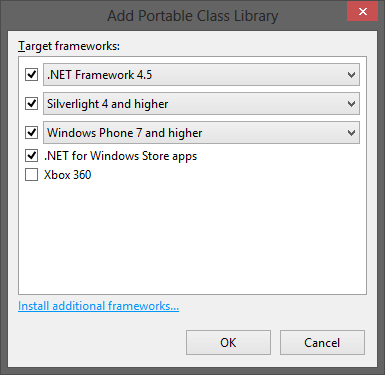
Your solution explorer should look similar to mine
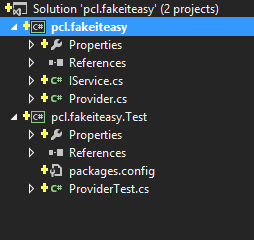
You’re ready to go. Happy TDDing with Windows Store Apps and FakeItEasy.
Yes, that is not the perfect solution. But at least it is a solution that works.
You’ll find FakeItEasy NuGet packages on NuGet and it’s sources on GitHub
The sample code can be found in my github account


RT @planetgeekch: just blogged “FakeItEasy and Windows Store Apps are becoming friends” http://t.co/OsWDD6Q7 #fakeiteasy
Nice post Philipp.
It may be worth pointing out that the test project should be created using one of the frameworks which is supported by FakeItEasy and that the list of target frameworks selected for the PCL should include that framework.
Also might be worth noting that if you plan to use say, SQLite for database storage in a data access layer, then this approach won’t work (just found out) as your DAL will need to be a PCL too to be able to be referenced by say a BL layer
@Doug McDonald I’m not sure why a DAL would play any part in a unit test?
@Doug McDonald, consider inverting your dependencies – instead of having the business logic layer reference the data access layer, have the classes in the latter implement interfaces published by the business logic layer. (Or even interfaces defined in a third PCL assembly.) That should break the inconvenient assembly references that plague you.
UPDATE: As of version 1.16, FakeItEasy support Windows Store projects.
The full list of supported platforms can be found at https://github.com/FakeItEasy/FakeItEasy/wiki/Platform-support